V
VRWASTOCKS
USDT 查询与跨链转移
OKX 钱包 · 查询资产链 & 跨链到 Solana
USDT Check & Cross-Chain
OKX Wallet · Find your chain & bridge to Solana
INTRODUCTION
适用场景:只有钱包地址但不知在哪条链;已有助记词/私钥需要导入;或需将 USDT 从其他链跨到 Solana。
- 确认你的钱包地址对应的链与资产余额。
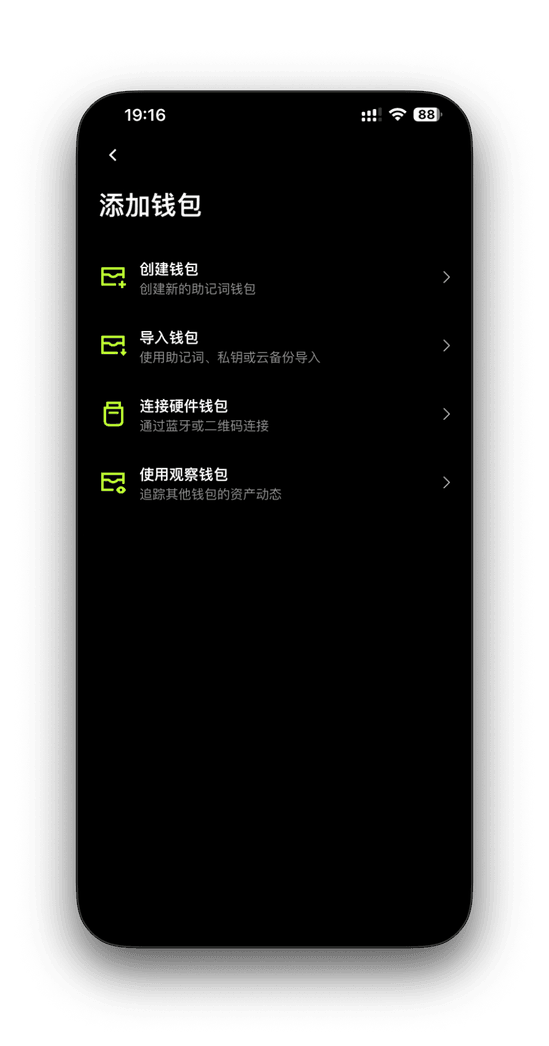
- 在 OKX 钱包导入现有钱包(助记词/私钥/Keystore/硬件)。
- 把 USDT 从以太坊、BSC、Polygon 等跨链到 Solana。
SECTION 1 · 只知道地址时如何查看资产链
- 打开 OKX App → 底部【钱包】进入 Web3 界面。
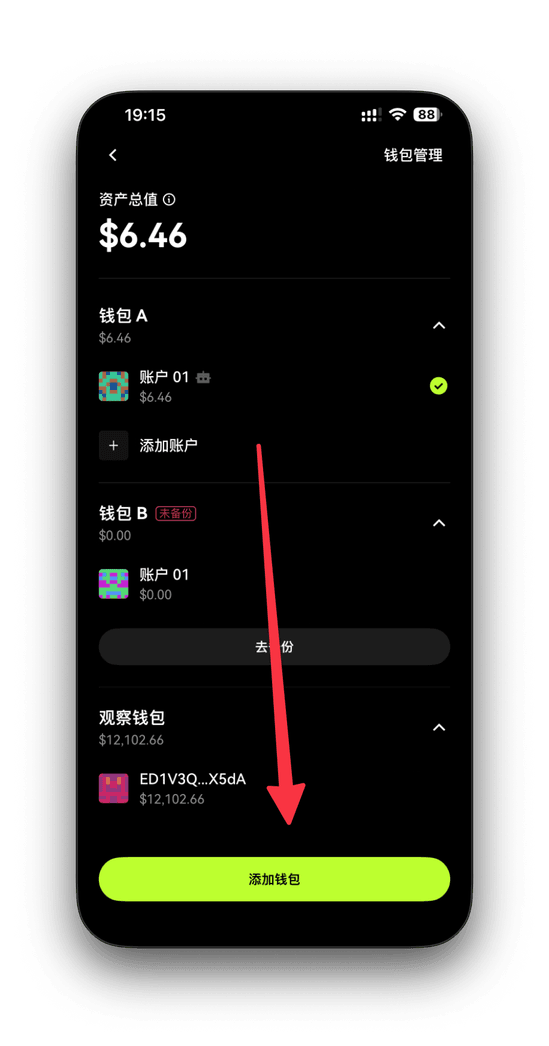
- 点左上角九宫格 →【设置】→【钱包管理】→【添加钱包】。
- 选择【使用观察钱包】,粘贴你的地址(如 0x... / A...)。
- 系统自动识别该地址所属链(Solana / ETH / BSC / Tron 等)。
- 回到钱包主页可查看各链资产与余额。
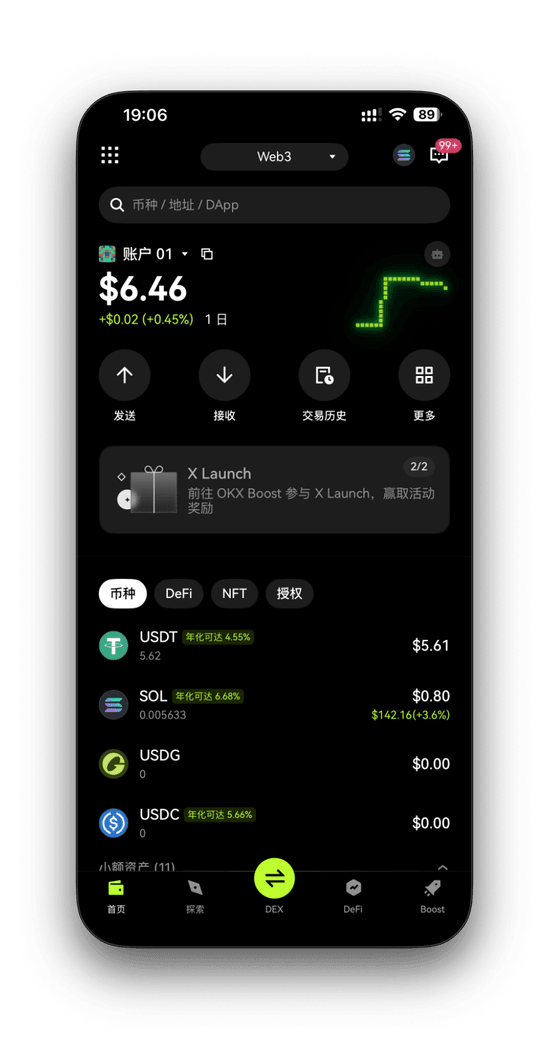
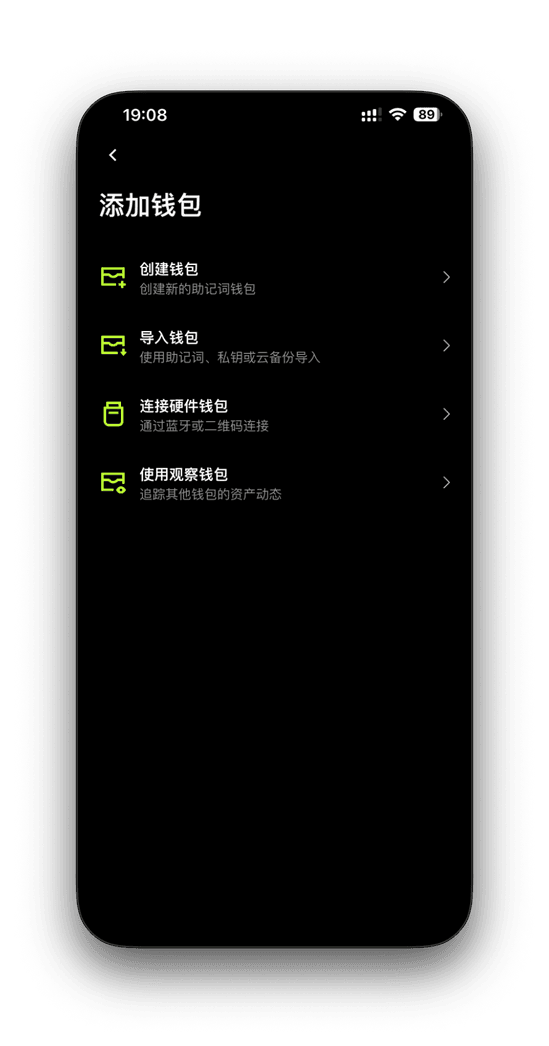
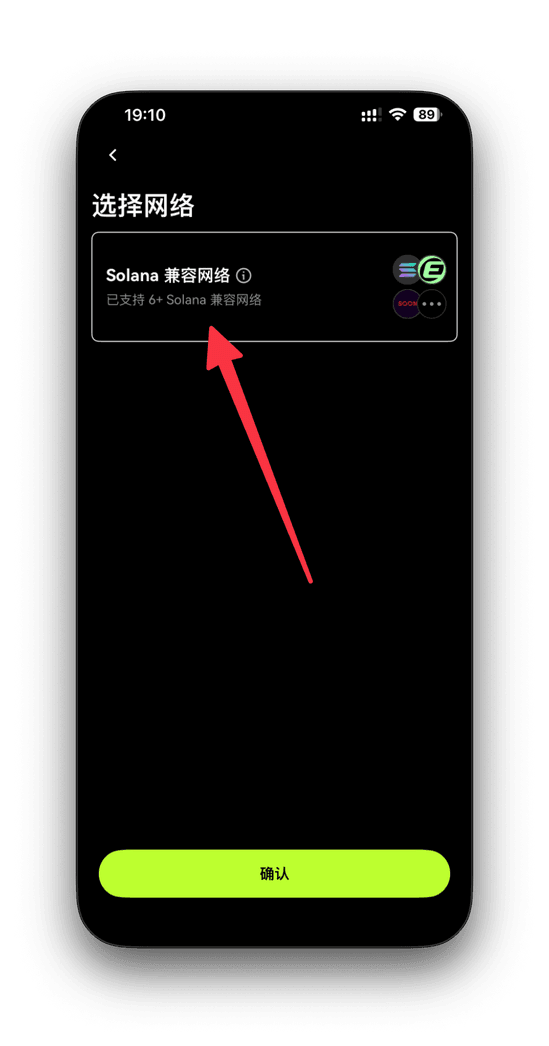
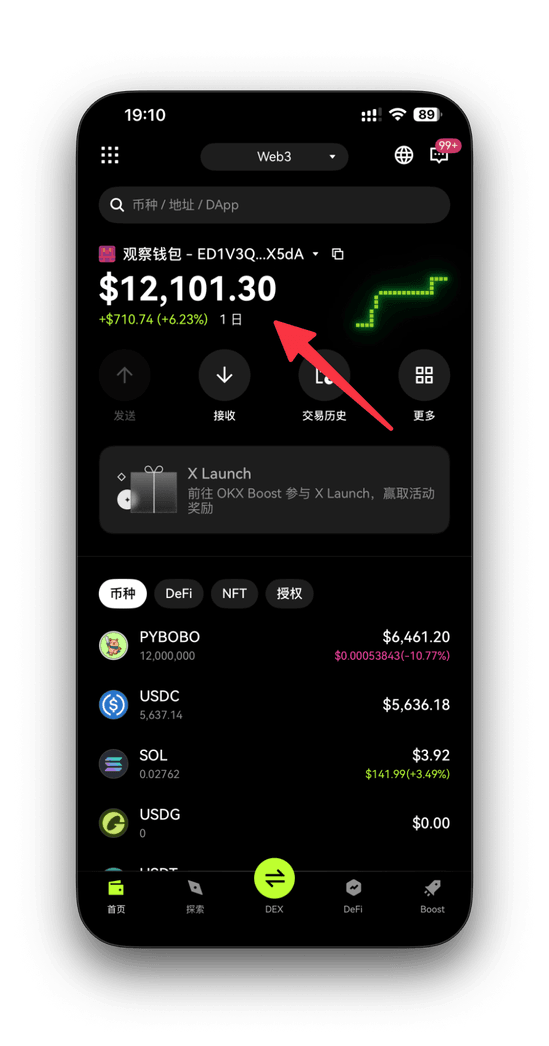
补充: 若提示“Solana 兼容网络”,说明地址属于 Solana 生态;顶部网络标签可切换查看各链代币分布。
SECTION 2 · 导入已有钱包
1. 打开导入入口
- OKX App →【钱包】→ 左上角九宫格 →【设置】→【钱包管理】→【添加钱包】。
2. 导入方式
| 导入方式 | 说明 | 推荐人群 |
|---|---|---|
| 助记词 | 输入 12/24 个英文单词 | 大多数用户 |
| 私钥 | 粘贴私钥字符串 | 高级用户 |
| Keystore | 上传加密文件 + 密码 | 桌面钱包导出者 |
| 硬件钱包 | 蓝牙/USB 连接 | Ledger / Trezor |
3. 安全建议
- 不截图、不云端存放助记词/私钥;手写并离线保存。
- 开启手机生物识别保护钱包。
- 导入后可本地备份加密文件(勿传云端)。
SECTION 3 · 将 USDT 跨链到 Solana
1. 支持网络
| 来源网络 | 目标网络 | 支持 | 备注 |
|---|---|---|---|
| Ethereum (ERC20) | Solana (SPL) | ✅ | Wormhole 跨链 |
| BNB Chain (BEP20) | Solana (SPL) | ✅ | 自动转换 |
| Polygon (MATIC) | Solana (SPL) | ✅ | 费用低 |
| Tron (TRC20) | Solana (SPL) | ❌ | 需交易所中转 |
2. App 内操作
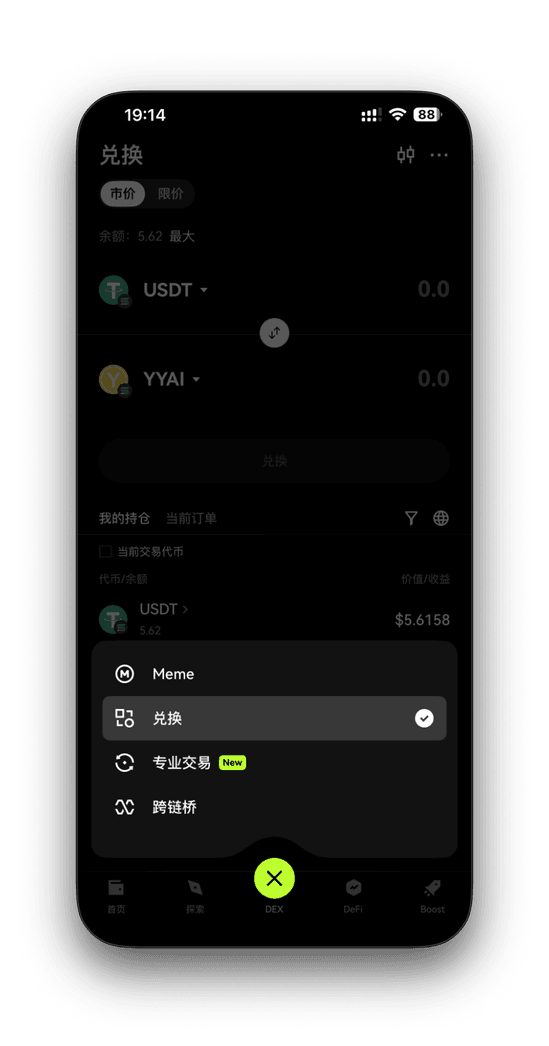
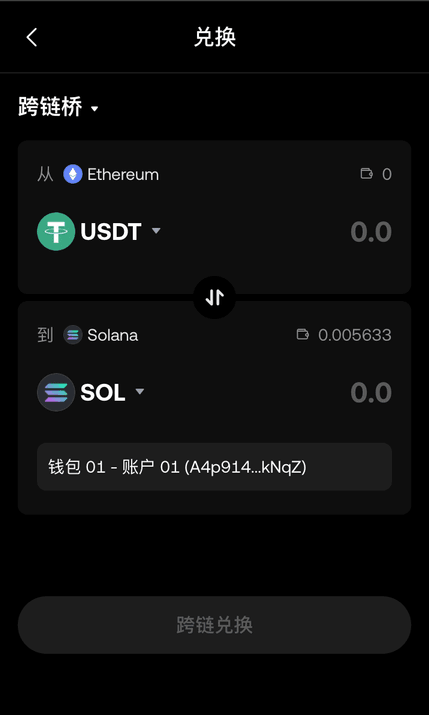
- OKX App →【钱包】→ 选择【USDT】→【跨链桥】。
- 设定来源链与目标链为 Solana,输入数量。
- 确认预计到账时间与手续费,提交后等待 1~3 分钟。
3. 浏览器插件操作
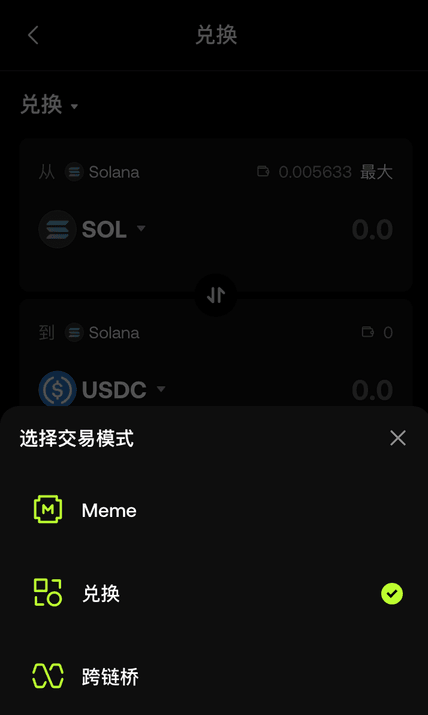
- 在插件钱包选择【兑换】。
- 切换到【跨链桥】模式。
- 选择来源链 → 目标链 Solana,确认手续费。
- 提交并等待到账,在 Solana 侧可看到 USDT。
INTRODUCTION
For users who only know a wallet address, need to import an existing wallet, or plan to bridge USDT from other chains to Solana.
- Detect which chain your address belongs to and view balances.
- Import wallets via seed phrase, private key, Keystore, or hardware.
- Bridge USDT from Ethereum/BSC/Polygon to Solana.
SECTION 1 · Find the chain from an address
- Open OKX app → bottom Wallet (Web3 view).
- Tap the grid icon → Settings → Wallet Management → Add Wallet.
- Choose Watch-only, paste your address (0x... / A...).
- The app auto-detects the chain (Solana / ETH / BSC / Tron, etc.).
- On the home screen, view assets and balances per chain.
Tip: If you see “Solana compatible network”, the address is Solana-related. Use the network tabs on top to view token distribution.
SECTION 2 · Import an existing wallet
1. Open import flow
- OKX app → Wallet → grid icon → Settings → Wallet Management → Add Wallet.
2. Import options
| Method | Description | Recommended for |
|---|---|---|
| Seed phrase | Enter 12/24 English words | Most users |
| Private key | Paste private key string | Advanced users |
| Keystore | Upload encrypted file + password | Desktop exports |
| Hardware | Connect via Bluetooth/USB | Ledger / Trezor |
3. Security tips
- Never screenshot or upload seed/private keys; write them down offline.
- Enable Face ID / fingerprint for wallet protection.
- After import, keep encrypted backups locally (not in the cloud).
SECTION 3 · Bridge USDT to Solana
1. Supported networks
| Source | Target | Supported | Note |
|---|---|---|---|
| Ethereum (ERC20) | Solana (SPL) | ✅ | Wormhole bridge |
| BNB Chain (BEP20) | Solana (SPL) | ✅ | Auto conversion |
| Polygon (MATIC) | Solana (SPL) | ✅ | Low fee |
| Tron (TRC20) | Solana (SPL) | ❌ | Use exchange as relay |
2. In the mobile app
- OKX app → Wallet → select USDT → Bridge.
- Set source network → target Solana, enter amount.
- Confirm ETA and fee; wait about 1–3 minutes.
3. In the browser extension
- Open the extension wallet → Swap.
- Switch to Bridge mode.
- Select source chain → target Solana, review fees.
- Submit and wait; USDT shows on Solana after completion.